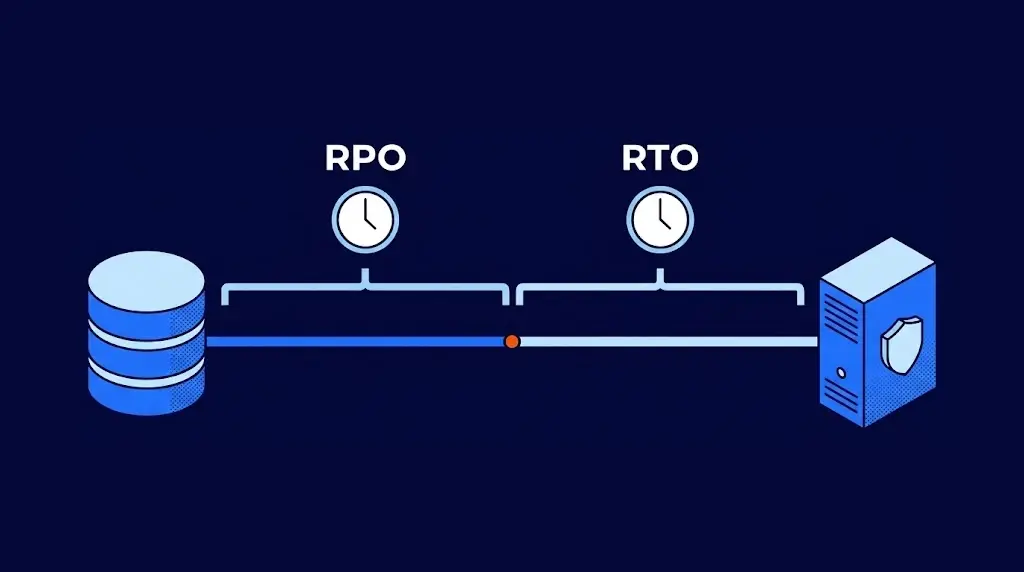
RTO (Recovery Time Objective) is the maximum time a system can be down after a failure before the damage to the business becomes unacceptable. RPO (Recovery Point Objective) is the maximum amount of data the company is willing to lose, measured in time backward from the failure to the last good copy. The first answers "how quickly do we get back up?" and the second "how far back do we recover the data?"
Both are set system by system, and together they determine what recovery costs: bringing an RTO down from a day to an hour, or an RPO from 24 hours to a few minutes, completely changes the technology you need and its price.
What RTO and RPO are
Anyone who has played a video game knows the scene: the console shuts off and, when you turn it back on, the game starts from the last save point. Everything you did after saving is gone; that is the RPO. The time it takes to load the game and get back to where you were is the RTO. Saving every five minutes reduces what you lose; having the console ready to power on quickly reduces how long you wait.
In a company, the sequence of an incident looks like this:
| Moment | What happens | What it measures |
|---|---|---|
| Last good copy | The most recent backup or replica that is not damaged. | This is where the RPO starts counting. |
| Failure | The system stops: a server that will not boot, an encryption attack, a human error. | This is where the RPO ends and the RTO begins. |
| Back in operation | The system works again and teams can get back to work. | This is where the RTO ends. |
That is why RTO and RPO are objectives, not results: they are the targets a company sets before anything fails.
The difference between RTO and RPO
They are mentioned together, but they measure different things and are solved with different tools:
| Aspect | RTO | RPO |
|---|---|---|
| Question it answers | How long can the system be down? | How much data can we lose? |
| Which way it looks | Forward: from the failure until operations resume. | Backward: from the failure to the last copy. |
| What reduces it | A ready-to-go secondary site, written procedures and automation. | More frequent backups or continuous replication. |
| Who feels it first | The teams that cannot work while the system is down. | The teams that have to re-enter whatever was lost. |
A system can have a short RTO and a long RPO, or the other way around. An informational website can tolerate losing the last week of changes, but it cannot be down for days. An accounting database can wait a few hours to come back, but it cannot lose a single journal entry. Both numbers are set in the disaster recovery plan (DRP), along with the order in which each system is recovered.
RTO and RPO examples by system
There are no numbers that are right for every company, but there are common ranges. These are starting points that each organization adjusts based on what it loses with every hour:
| System | Typical RTO | Typical RPO | What covers it |
|---|---|---|---|
| Online store | 30 minutes | 5 minutes | Continuous replication and a secondary environment ready to power on. |
| ERP and billing | 2 hours | 30 minutes | Continuous replication or very frequent backups. |
| Email and collaboration | 4 hours | 4 hours | Cloud backup several times a day. |
| Shared folders | 8 hours | 12 hours | Backup twice a day. |
| Informational website | 1 day | 1 week | Weekly backup and a plan to republish it. |
One detail changes the real RPO when an attack is involved. If ransomware encrypted files days before anyone noticed, the most recent copies are damaged too and the useful recovery point is earlier. That is why it pays to be able to go back to a specific moment in time, beyond just the latest copy; we explain how that attack works in what is ransomware.
How to calculate what each hour of downtime costs
The right RTO comes from a simple calculation: how much you lose for every hour the system is down. With that number, leadership can compare the cost of the solution with the cost of waiting. Here is the calculation for a distributor in Mexico that bills 30 million pesos a month and whose ERP halts sales when it fails:
- Sales that depend on the system. 30 million divided by 22 business days and 10 operating hours: about 136,000 pesos per hour.
- Staff who cannot work. 40 employees at a cost of 250 pesos per hour each: 10,000 pesos per hour.
- Recovery costs and penalties. Overtime to re-enter data, late deliveries and contract penalties: about 20,000 pesos per hour.
- Total. Around 166,000 pesos for every hour without the ERP.
With that number, an eight-hour RTO represents 1.3 million pesos per incident; a one-hour RTO, 166,000. The difference is the budget that can reasonably be invested to shorten recovery. Some sales are recovered later, so it makes sense to adjust the first line with the sales team.
At a global scale, the 2024 ITIC survey found that for more than 90% of midsize and large companies, one hour of downtime costs more than $300,000.
If the outage is caused by an attack, other costs pile on, which we break down in how much a ransomware attack costs.
How to reduce RTO and RPO
Back to the video game: saving more often and keeping the console ready are two different improvements. In a company, each objective is tackled with its own measures.
To lower the RPO:
- Back up critical systems more often instead of applying the same rule to everything.
- Continuously replicate the servers that cannot afford to lose even minutes of data.
- Keep a copy away from the main site, protected against deletion.
- Retain several recovery points, so you can go back to a moment before an encryption attack or an error.
To lower the RTO:
- Have a secondary site already prepared in the cloud, instead of sourcing equipment on the day of the failure. That is how disaster recovery as a service works.
- Write the recovery procedure step by step, with owners and a startup order.
- Automate how systems power on at the secondary site.
- Recover first whatever costs the most per hour, based on the calculation above.
RTO on paper vs real RTO
An RTO written in a document guarantees nothing until it is tested. These are the three assumptions that most often turn out to be false on the day of an incident:
| What the document says | What happens in practice |
|---|---|
| "We have backups, so we will be back in a few hours." | Restoring several servers from a backup can take days; a backup protects the data, while the time to recover depends on everything else. |
| "We back up every night, so the RPO is 24 hours." | If last night's backup failed or was encrypted, the real RPO is the last good copy, which may be a week old. |
| "We tested it when it was installed." | Since then, servers, applications and people have changed. Without a test every year, the number is a hope. |
A recovery test turns the objective into a data point: it measures how long each system really takes to come back and whether the data is complete. That gap between the target and how long recovery actually takes is the same one that separates RTO from MTTR, one of the MTTD, MTTA and MTTR metrics used to evaluate incident response.

Frequently asked questions about RTO and RPO
RTO stands for Recovery Time Objective, how long a system can be down. RPO stands for Recovery Point Objective, how much data can be lost, counted in time from the last copy. Together they define how quickly and to what point each system is recovered.
MTD (Maximum Tolerable Downtime) is the limit beyond which the damage to the business becomes irreversible. The RTO should always be shorter than the MTD, to leave room to verify that the system works before resuming operations.
Almost: with two active sites running at the same time and replicating in real time, both data loss and waiting time get close to zero. It is an expensive architecture that is only justified for systems where every minute costs a lot, such as payments or high-volume e-commerce.
The owner of each process says how much time and how much data their area can afford to lose; IT says what technology is needed to meet that and what it costs; and leadership approves the balance between the two.
Yes, because it lets you back up more often without depending on local tapes or disks. A managed service, such as our cloud backup, also monitors that every backup completes.
At least once a year, together with the recovery test, and whenever something important changes: a new system, a migration to the cloud or a process that becomes critical to sales.

Zoilijee is Founder and KAM of TecnetOne, she specializes in business development for Cloud, Hybrid and Enterprise Cyber Resilience environments, her main vision is to empower and protect organizations on new emerging threats in IT.