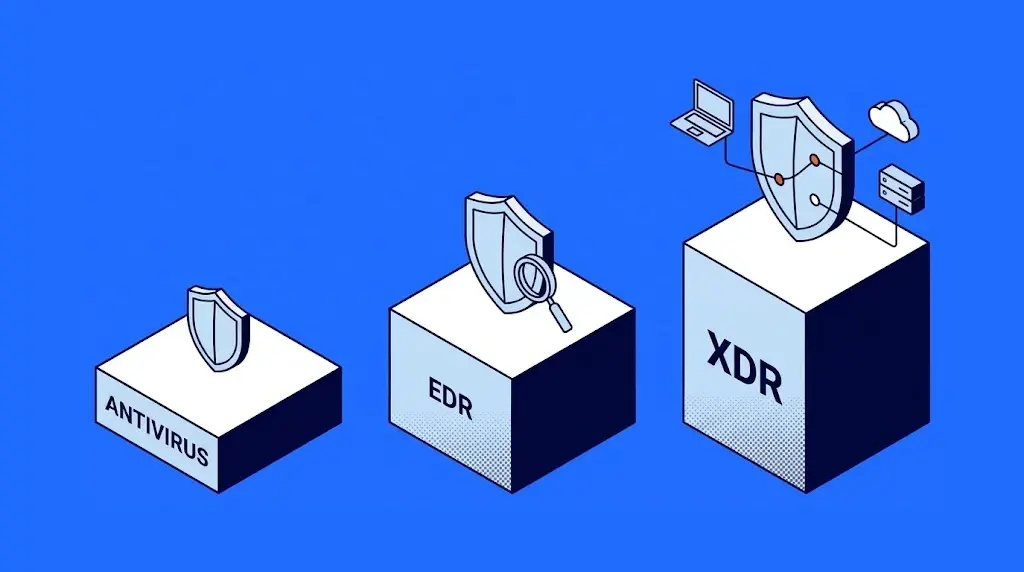
An EDR (Endpoint Detection and Response) is a security tool that continuously monitors the behavior of a company's computers, servers and other devices, detects suspicious activity even when the threat is new, and responds immediately: it isolates the device, stops processes and rolls back changes. It differs from antivirus in that it does not depend on recognizing a known threat, and from XDR (Extended Detection and Response) in that it is limited to devices, while XDR also correlates email, identities, network and cloud.
The three work as complementary layers. Antivirus stops what is already known, EDR detects anything behaving oddly inside each device, and XDR connects the pieces of an attack that moves through several systems at once.
What is EDR
There are two ways to catch an intruder at an airport. The first is to check their name against a watch list at the entrance checkpoint; it works for people already flagged, and fails with someone traveling under a clean name. The second is to watch what they do once inside: who circles the same door three times, who leaves a suitcase and walks away. Antivirus works like the watch list; EDR works like the officers who observe behavior in the terminal and can stop someone in the act.
To do this, EDR installs a small program (an agent) on each device that records everything that happens: which programs open, which files they modify, which addresses they connect to and which accounts they use. When a sequence of actions matches an attack pattern, it raises an alert and can act without waiting for anyone. It also keeps that history, so you can later reconstruct what happened, step by step.
Antivirus, EDR and XDR: the differences
Business antivirus today is usually sold as an EPP (Endpoint Protection Platform): classic antivirus plus features such as a device firewall and USB control. This is how the three layers compare:
| Aspect | Antivirus (EPP) | EDR | XDR |
|---|---|---|---|
| What it watches | Files that reach the device. | The behavior of each device. | Devices, email, identities, network and cloud at once. |
| How it detects | Compares against known threats. | Recognizes anomalous behavior, even when the threat is new. | Correlates signals from several sources to see the full attack. |
| What it does on detection | Blocks or quarantines the file. | Isolates the device, stops processes and rolls back changes. | Responds across several layers: isolates the device, blocks the account, pulls the email from every mailbox. |
| What it leaves to investigate | Very little: a block notification. | The full history of what happened on the device. | The full story of the attack, from start to finish. |
| At the airport | The watch list. | The officers watching the terminal. | The control room that sees every camera, flight and parking lot. |
The distinction between signature-based and behavior-based detection is the same one we use to compare tools in our guide to the best antivirus for business.
The same attack seen by all three
The difference is easiest to understand with an example. Someone on the finance team receives an email that appears to come from a supplier, with a link to an "invoice". The file is new malware that no list recognizes yet. Here is how each layer experiences it:
| Moment | Antivirus only | With EDR | With XDR |
|---|---|---|---|
| The email arrives | It does not check it: email is outside its scope. | It does not see it yet. | It detects the suspicious sender and pulls the email from every mailbox. |
| She opens the file | It does not recognize it and lets it through. | It sees that a document opened a command console and launched a hidden program: alert. | Same as EDR, already linked to the original email. |
| The program tries to encrypt files | It may stop it if it has ransomware protection; otherwise, it is too late. | It stops the process, isolates the laptop from the network and restores the encrypted files. | It also blocks the account used and searches for the same file on every device. |
| The next day | Nobody is quite sure what happened. | There is a full history of the affected device. | There is a report of the entire attack, from the email to the encryption attempt. |
That last row matters more than it seems: without knowing how the attack got in, there is no way to close that door. What happens when nobody stops it is covered in our article on what ransomware is.
Which one your company needs
The answer depends less on size and more on what you need to protect and who can handle the alerts:
- If you have few devices, no sensitive customer data and no remote work: a managed business antivirus is the minimum, always paired with backups.
- If you handle customer data, your team works outside the office or your insurer asks about device protection: EDR on every computer and server. It is the layer that more and more cyber insurance questionnaires ask for.
- If your operations run on Microsoft 365 or Google Workspace, you use several cloud services or you have regulatory obligations: XDR, to see what happens across email, accounts and devices in one place.
- If nobody on your team can review alerts at night and on weekends: any of the three options needs someone to run it. That leads to the next section.
Who handles the alerts
An EDR or XDR without people behind it is like an airport with cameras nobody watches. The tool detects and can contain the obvious, but someone has to decide what is a real attack, investigate it and close the door it came through. And attacks do not keep office hours: many are launched at night or on weekends, when fewer people are around to notice.
That is why MDR (Managed Detection and Response) exists: a service in which an external team runs the tool and handles alerts around the clock.
It is the same principle behind a SOC (Security Operations Center): technology raises the alert and people make the call. A good SOC applies that principle to every alert, including a ransomware attempt in progress.

Frequently asked questions about EDR, antivirus and XDR
EDR stands for Endpoint Detection and Response. The term was coined by the research firm Gartner in 2013 to describe tools that, beyond blocking threats, record what happens on each device and make it possible to investigate and respond.
It is any device that connects to the company network and could become an entry point for an attack: laptops, desktop computers, servers, and work phones and tablets.
In practice, most current EDR tools include antivirus features, so they work as a single tool. What you should avoid is installing two different protection products on the same device, because they can interfere with each other.
XDR stands for Extended Detection and Response. It is the evolution of EDR toward more sources: besides devices, it analyzes email, identities, network and cloud to show a complete attack in one place.
On current hardware the impact is usually minimal, because the agent is lightweight and much of the analysis happens in the cloud. Even so, it is a good idea to install it first on a small group of devices to confirm it does not conflict with any of the company's applications.
Your IT team or a specialized provider. What matters is that someone reviews the alerts every day and tunes the rules. That is how we do it in our managed cybersecurity services.

Zoilijee is Founder and KAM of TecnetOne, she specializes in business development for Cloud, Hybrid and Enterprise Cyber Resilience environments, her main vision is to empower and protect organizations on new emerging threats in IT.